Popular Vendors
Demo Databricks Databricks-Certified-Associate-Developer-for-Apache-Spark-3.5 Exam Questions
Demo practice questions for guest users.
Question 1
A data scientist of an e-commerce company is working with user data obtained from its subscriber database and has stored the data in a DataFrame df_user. Before further processing the data, the data scientist wants to create another DataFrame df_user_non_pii and store only the non-PII columns in this DataFrame. The PII columns in df_user are first_name, last_name, email, and birthdate.
Which code snippet can be used to meet this requirement?
Correct Answer: A
Explanation:
To remove specific columns from a PySpark DataFrame, the drop() method is used. This method
returns a new DataFrame without the specified columns. The correct syntax for dropping multiple
columns is to pass each column name as a separate argument to the drop() method.
Correct Usage:
df_user_non_pii = df_user.drop("first_name", "last_name", "email", "birthdate")
This line of code will return a new DataFrame df_user_non_pii that excludes the specified PII
columns.
Explanation of Options:
A . Correct. Uses the drop() method with multiple column names passed as separate arguments,
which is the standard and correct usage in PySpark.
B . Although it appears similar to Option A, if the column names are not enclosed in quotes or if there's a syntax error (e.g., missing quotes or incorrect variable names), it would result in an error.
However, as written, it's identical to Option A and thus also correct.
C . Incorrect. The dropfields() method is not a method of the DataFrame class in PySpark. It's used
with StructType columns to drop fields from nested structures, not top-level DataFrame columns.
D . Incorrect. Passing a single string with comma-separated column names to dropfields() is not valid
syntax in PySpark.
Reference:
PySpark Documentation: DataFrame.drop
Stack Overflow Discussion: How to delete columns in PySpark DataFrame
Question 2
A data engineer is working on a Streaming DataFrame streaming_df with the given streaming data:
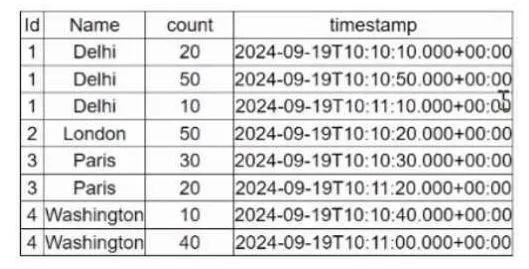
Which operation is supported with streamingdf ?
Correct Answer: D
Explanation:
In Structured Streaming, only a limited subset of operations is supported due to the nature of
In Structured Streaming, only a limited subset of operations is supported due to the nature of
unbounded data. Operations like sorting (orderBy) and global aggregation (countDistinct) require a
full view of the dataset, which is not possible with streaming data unless specific watermarks or
windows are defined.
Review of Each Option:
A . select(countDistinct("Name"))
Not allowed — Global aggregation like countDistinct() requires the full dataset and is not supported
directly in streaming without watermark and windowing logic.
Reference: Databricks Structured Streaming Guide – Unsupported Operations.
B . groupby("Id").count()
Supported — Streaming aggregations over a key (like groupBy("Id")) are supported. Spark maintains
intermediate state for each key.
Reference: Databricks Docs → Aggregations in Structured Streaming
(https://docs.databricks.com/structured-streaming/aggregation.html)
C . orderBy("timestamp").limit(4)
Not allowed — Sorting and limiting require a full view of the stream (which is infinite), so this is
unsupported in streaming DataFrames.
Reference: Spark Structured Streaming – Unsupported Operations (ordering without
watermark/window not allowed).
D . filter(col("count") < 30).show()
Not allowed — show() is a blocking operation used for debugging batch DataFrames; it's not allowed
on streaming DataFrames.
Reference: Structured Streaming Programming Guide – Output operations like show() are not
supported.
Reference Extract from Official Guide:
“Operations like orderBy, limit, show, and countDistinct are not supported in Structured Streaming
because they require the full dataset to compute a result. Use groupBy(...).agg(...) instead for
incremental aggregations.”
— Databricks Structured Streaming Programming Guide
Question 3
An MLOps engineer is building a Pandas UDF that applies a language model that translates English
strings into Spanish. The initial code is loading the model on every call to the UDF, which is hurting
the performance of the data pipeline.
The initial code is:
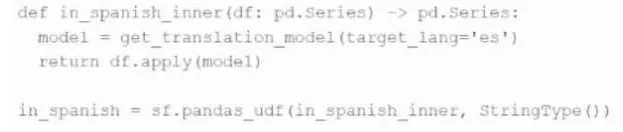
def in_spanish_inner(df: pd.Series) -> pd.Series:
model = get_translation_model(target_lang='es')
return df.apply(model)
in_spanish = sf.pandas_udf(in_spanish_inner, StringType())
How can the MLOps engineer change this code to reduce how many times the language model is loaded?
Correct Answer: D
Explanation:
The provided code defines a Pandas UDF of type Series-to-Series, where a new instance of the
The provided code defines a Pandas UDF of type Series-to-Series, where a new instance of the
language model is created on each call, which happens per batch. This is inefficient and results in significant overhead due to repeated model initialization.
To reduce the frequency of model loading, the engineer should convert the UDF to an iterator-based
Pandas UDF (Iterator[pd.Series] -> Iterator[pd.Series]). This allows the model to be loaded once per
executor and reused across multiple batches, rather than once per call.
From the official Databricks documentation:
“Iterator of Series to Iterator of Series UDFs are useful when the UDF initialization is expensive… For
example, loading a ML model once per executor rather than once per row/batch.”
— Databricks Official Docs: Pandas UDFs
Correct implementation looks like:
python
CopyEdit
@pandas_udf("string")
def translate_udf(batch_iter: Iterator[pd.Series]) -> Iterator[pd.Series]:
model = get_translation_model(target_lang='es')
for batch in batch_iter:
yield batch.apply(model)
This refactor ensures the get_translation_model() is invoked once per executor process, not per
batch, significantly improving pipeline performance.
Question 4
A Spark DataFrame df is cached using the MEMORY_AND_DISK storage level, but the DataFrame is too large to fit entirely in memory. What is the likely behavior when Spark runs out of memory to store the DataFrame?
Correct Answer: C
Explanation:
When using the MEMORY_AND_DISK storage level, Spark attempts to cache as much of the
When using the MEMORY_AND_DISK storage level, Spark attempts to cache as much of the
DataFrame in memory as possible. If the DataFrame does not fit entirely in memory, Spark will store
the remaining partitions on disk. This allows processing to continue, albeit with a performance
overhead due to disk I/O.
As per the Spark documentation:
"MEMORY_AND_DISK: It stores partitions that do not fit in memory on disk and keeps the rest in
memory. This can be useful when working with datasets that are larger than the available memory."
— Perficient Blogs: Spark - StorageLevel
This behavior ensures that Spark can handle datasets larger than the available memory by spilling
excess data to disk, thus preventing job failures due to memory constraints.
Question 5
A data engineer is building a Structured Streaming pipeline and wants the pipeline to recover from failures or intentional shutdowns by continuing where the pipeline left off. How can this be achieved?
Correct Answer: D
Explanation:
To enable a Structured Streaming query to recover from failures or intentional shutdowns, it is